Understanding Game Performance
In the rapidly evolving landscape of mobile gaming, the term game performance has become paramount, particularly for Android users in Malaysia. Game performance refers to how well a game runs on a device, which includes its ability to maintain high frame rates, responsiveness, and overall fluidity during gameplay. A crucial metric in this realm is Frames Per Second (FPS), which measures how many frames are displayed in one second. Higher FPS typically results in smoother and more enjoyable gameplay, making it essential for competitive gaming and immersive experiences.
Tips for Improving Performance
Improving your Android game's performance can significantly enhance your gaming experience. Here are 10 effective methods to help you achieve optimal performance on your device:
- 1. Optimize Graphics Settings: Lowering the graphics quality in your game settings can boost FPS. Many games allow you to adjust settings like resolution, texture quality, and shadow effects to improve performance.
- 2. Close Background Applications: Ensure no unnecessary apps are running in the background, as they can consume resources and slow down your game.
- 3. Clear Cache Regularly: Clearing your app cache can free up storage space and enhance performance. This can be done through your device settings.
- 4. Use Game Booster Applications: There are many apps designed to optimize your device for gaming, ensuring that resources are allocated efficiently.
- 5. Regular System Updates: Keeping your Android OS and apps updated can provide performance enhancements and security improvements.
- 6. Limit Background Sync: Disable automatic syncing for apps that you don’t need while gaming to save data and improve performance.
- 7. Adjust Power Settings: Switch your device to performance mode, if available, to prioritize gaming performance over battery life.
- 8. Use External Cooling Solutions: Overheating can throttle performance. Consider using cooling pads or cases designed for gaming devices.
- 9. Upgrade Your Device: If your device frequently struggles with performance, it might be time to consider a more powerful phone.
- 10. Check for Malware: Ensure your device is free of malware, which can significantly hinder performance.
Performance Optimization Techniques
To delve deeper into enhancing your gaming experience, let’s explore some performance optimization techniques and tools available to Malaysian gamers:
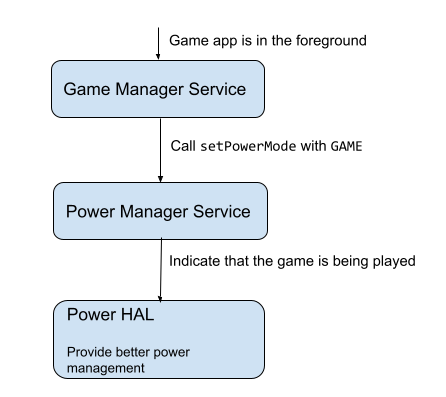
- Game Mode: Many Android devices come equipped with a game mode that prioritizes gaming applications. This feature can block notifications, allocate more system resources, and optimize performance.
- Frame Rate Limiter: Some games offer an option to limit FPS, which can reduce overheating and improve battery life without sacrificing too much performance.
- Resolution Scaling: This technique allows games to render at a lower resolution while maintaining the display at a higher resolution, improving FPS.

Hardware Recommendations
For those looking to invest in better gaming hardware, here are some recommendations that align with the Malaysian market:
- Smartphones: Consider models like the ASUS ROG Phone 6, Xiaomi Black Shark 5, or the Samsung Galaxy S21 FE, which offer powerful processors and excellent graphics capabilities.
- Cooling Accessories: Invest in external cooling fans or cases designed for gaming to prevent overheating during intense gaming sessions.
- Headphones: High-quality gaming headphones can provide an immersive experience, essential for competitive gaming.
Software Tweaks
In addition to hardware, software tweaks play a significant role in enhancing game performance:
- Adjust your device's display settings to match the game requirements for optimal performance.
- Install lightweight launchers that consume fewer resources, allowing your games to run more smoothly.
- Disable animations and visual effects in your device settings to free up additional resources.
Common Issues and Solutions
Even with the best hardware and software adjustments, you may still encounter some common performance issues. Here’s how to tackle them:
Reducing Lag in Android Games
Lag can be one of the most frustrating issues for gamers. Here are practical steps to minimize it:
- Ensure you have a stable internet connection, preferably via Wi-Fi for online gaming.
- Reduce the number of connected devices to your network to free up bandwidth.
- Check for any network congestion, especially during peak hours.
Apps to Boost Gaming Performance
There are numerous apps designed specifically to optimize game performance. Here are some popular choices:
- Game Booster: This app optimizes your device for gaming by freeing up RAM and processing power.
- GLTools: An advanced tool that allows you to customize graphics settings and modify game resolution.
- CCleaner: A utility app that helps clear junk files and cache, ensuring your device runs smoothly.
Frequently Asked Questions
What can I do to boost my Android game's performance?
To boost your Android game's performance, optimize graphics settings, close background applications, clear cache, and consider using game booster apps. Keeping your device updated and adjusting power settings can also make a significant difference.
How to reduce lag in Android games?
To reduce lag, ensure a stable internet connection, limit background apps, and optimize game settings. Using a game booster app can also help manage resources effectively.