Everything You Need to Know About Game Crashes and Freezes in 2026
For gamers in Malaysia, there's nothing more frustrating than experiencing game crashes and freezes right in the middle of an intense gaming session. With the gaming landscape constantly evolving, understanding the common causes and effective solutions for these issues has become essential for a smooth gaming experience. In this comprehensive guide, we’ll explore the reasons behind game crashes, delve into troubleshooting steps, and provide preventive measures to keep your gaming rig running smoothly.
Common Causes of Game Crashes and Freezes
Before diving into solutions, it’s vital to understand what might be causing these frustrating interruptions. Game crashes can stem from various issues, and for the Malaysian gaming community, the following factors are particularly relevant:
- Software Bugs: Developers continually release patches to fix bugs. However, these updates can sometimes introduce new problems, leading to crashes.
- Hardware Limitations: Many gamers may still be using older hardware that struggles to keep up with the latest titles. Incompatibility between hardware and new games is a common issue.
- Compatibility Issues: A game may not be optimized for your specific operating system or hardware configuration, leading to freezing issues during gameplay.
According to statistics, over 50% of gamers have experienced game crashes at some point. For Malaysian gamers, this can be particularly frustrating as it affects both session enjoyment and competitive play in titles popular in the region.
Effective Solutions to Resolve Game Crashes
When you encounter game crashes, it’s crucial to take immediate action. Here are detailed troubleshooting steps that can help you resolve these issues effectively:
- Update Your Game: Always ensure that your game is up to date. Developers frequently release patches that address stability issues.
- Install Latest Drivers: Keeping your graphic drivers updated is key. Whether you’re using NVIDIA or AMD, outdated drivers can contribute to performance problems.
- Adjust Game Settings: Lowering game settings such as resolution and graphics quality can significantly enhance performance and reduce the chances of crashes.
Additionally, consider the following methods:
- Run as Administrator: Sometimes, games require administrative permissions to run smoothly. Right-click the game executable and select “Run as administrator.”
- Disable Background Applications: Closing unnecessary applications running in the background can free up resources and improve game performance.
- Check System Requirements: Always verify that your system meets the minimum requirements of the game. If not, it may be time for an upgrade.
Preventive Measures to Avoid Future Issues
Preventing game crashes and freezes is often more effective than troubleshooting after the fact. Here are best practices to maintain your system and avoid these common pitfalls:
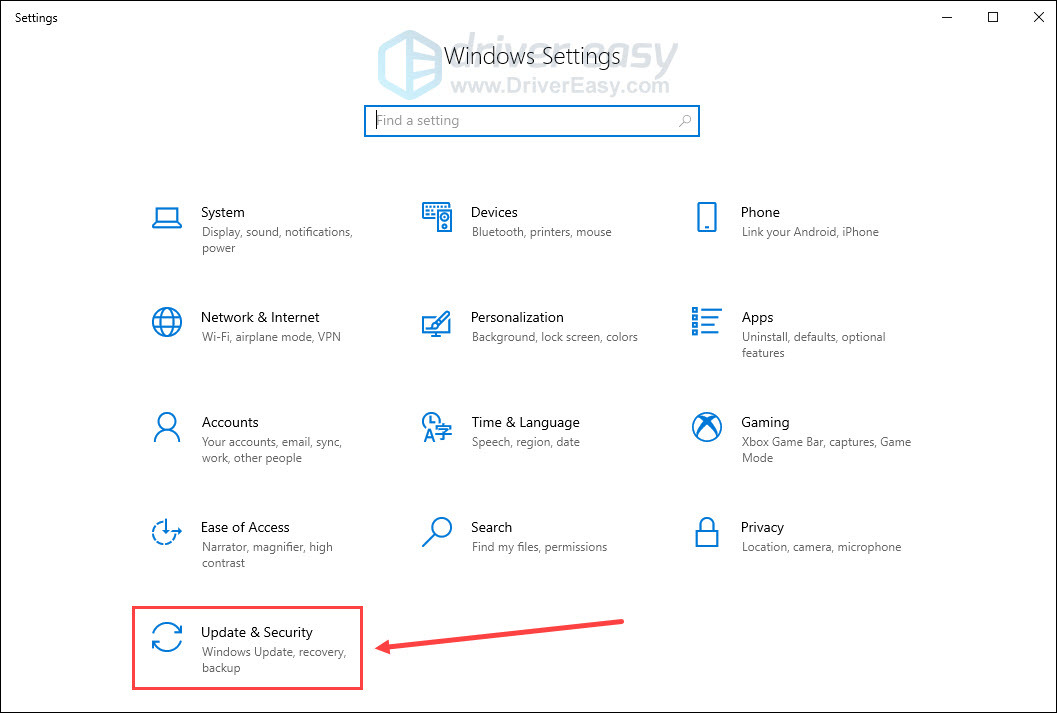
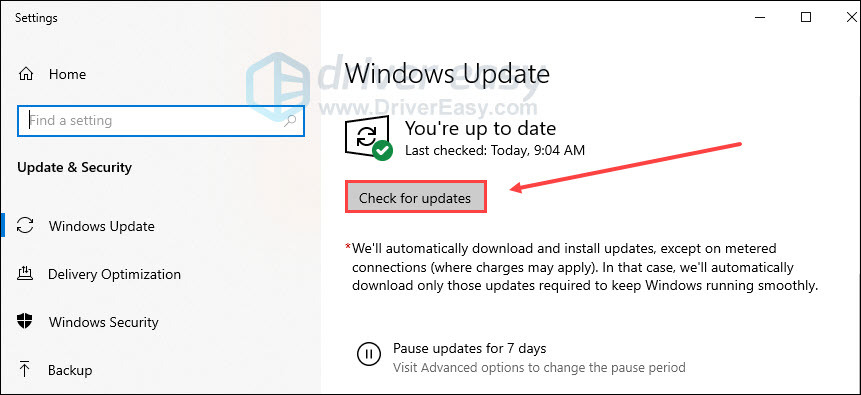
- Regular Updates: Ensure your operating system and all software are updated regularly. Regular updates can reduce game freezing by up to 30%.
- System Cleaning: Use tools to clean your system and remove unnecessary files. This can help maintain optimal performance.
- Monitor Hardware Performance: Use monitoring software to keep an eye on CPU and GPU temperatures. Overheating can lead to crashes, especially during intensive gaming sessions.
Technical Fixes for Popular Platforms
Different platforms may require specific troubleshooting techniques. Here are some tailored solutions for common gaming setups:
NVIDIA Users:
- Ensure you are using the latest GeForce Experience software.
- Adjust the NVIDIA Control Panel settings for optimal performance.
AMD Users:
- Update to the latest Radeon software.
- Tweak your graphics settings for better stability.
Microsoft and Sony Consoles:
- For Xbox and PlayStation, check for system updates regularly.
- Clear the cache periodically to enhance performance.
User Experiences and Feedback
Understanding the experiences of other gamers can provide valuable insights into resolving game crashes. Many players have shared their solutions online, creating a community of support. Here are some commonly reported fixes:
- Some gamers have found success by uninstalling and reinstalling problematic games.
- Others have recommended using third-party optimization tools to enhance performance.
Engaging with local gaming forums can also help in finding specific solutions tailored to the Malaysian gaming community. Sharing feedback on local server issues or game performance can lead to collective insights that benefit all gamers.
FAQs
What causes games to crash?
Games can crash due to a variety of reasons, including software bugs, hardware limitations, compatibility issues, and outdated drivers. Ensuring your system meets the minimum requirements can help mitigate these issues.
How can I prevent game freezes?
To prevent game freezes, maintain your system with regular updates, monitor hardware performance, and optimize game settings. Also, be mindful of background applications that may consume resources.
In conclusion, navigating the world of game crashes and freezes requires both understanding and proactive measures. By staying informed and implementing these solutions, Malaysian gamers can ensure a more enjoyable gaming experience in 2026 and beyond.