Why Are Your Android Games Lagging After the 2026 Update? Here's What You Need to Know
As the gaming community in Malaysia continues to grow, many players are experiencing issues with their favorite Android games lagging after the recent 2026 update. Whether you're a casual gamer or a dedicated esports enthusiast, encountering lag can be frustrating, especially when you’re in the heat of battle. In this article, we’ll explore the common causes of lagging games, provide troubleshooting steps, share real user testimonials, and offer tips for optimizing your gaming performance on Android devices.
Common Causes
Understanding why your Android games might lag after an update is crucial for resolving these frustrating issues. Here are some of the most common reasons:
- Software Incompatibilities: Updates from Google or the game developers can sometimes lead to compatibility issues. For example, a new Android version may not be fully optimized for specific games, particularly those that are older or less frequently updated.
- Device Settings: Sometimes, the default settings on your Android device may not be conducive for gaming. Power-saving modes, background apps, or even misconfigured graphics settings can lead to performance degradation.
- Insufficient Storage: Updates often require additional storage space. If your device is running low on storage, it can result in lagging or stuttering during gameplay.
- Network Issues: For online games, latency can be a significant factor. An unstable Wi-Fi connection or low mobile data signal can cause games to lag, leading to a poor gaming experience.
These issues are not uncommon among Malaysian gamers, with many reporting similar problems on local forums and social media groups. Indeed, both Samsung and Xiaomi users have expressed their frustrations with lagging games following updates.
Troubleshooting Steps
If your Android games are lagging after the 2026 update, don't despair! Here’s a step-by-step guide to help you troubleshoot and resolve these issues:
- Check for Updates: Ensure that your Android operating system and the game itself are updated to the latest versions. Sometimes, newer patches are released to address performance issues.
- Clear Cache: Clearing the cache for both your game and your Android device can significantly improve performance. Go to Settings > Apps > [Your Game] > Storage, then click on "Clear Cache."
- Adjust Graphics Settings: Lower the graphics settings in your game. This can alleviate some of the performance burden on your device, particularly for high-demand games.
- Disable Background Apps: Close any unnecessary apps running in the background. This will free up RAM and processing power for your game, potentially reducing lag.
- Reboot Your Device: Sometimes, a simple restart can resolve many performance issues by refreshing your device's memory.
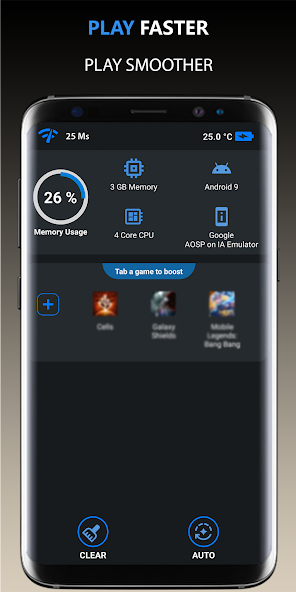
As you can see above, these steps can often resolve many common issues that lead to lagging in Android games. If problems persist, consider reaching out to the game's support team or visiting online forums where fellow gamers can share their solutions.
User Testimonials
Real experiences from fellow Malaysian gamers can offer valuable insights and solutions. Here are some testimonials from users who faced lagging issues and how they tackled them:
- Aiman, Kuala Lumpur: "After the latest update, my game was practically unplayable. I cleared the cache and turned down the graphics settings, and it made a huge difference!"
- Siti, Penang: "I was having terrible lag while playing PUBG Mobile. I discovered that disabling background apps helped a lot. Now, my gameplay is smoother than ever."
- Farhan, Johor Bahru: "I initially thought it was my device, but after checking for updates and clearing the cache, my games ran much better. Always check those settings!"
The experiences shared by Aiman, Siti, and Farhan reflect the common struggles many face in the gaming community, particularly after updates. Their solutions may just work for you too!
Performance Optimization
If you're looking to enhance your gaming performance on Android, here are some additional tips that can help you get the most out of your device:
- Use Game Mode: Many modern Android devices, especially from brands like Samsung and Xiaomi, come equipped with a Game Mode feature. This optimizes system resources for gaming, improving performance.
- Free Up Storage Space: Regularly uninstall unused apps and delete unnecessary files or media. More free space can lead to better performance.
- Adjust Power Settings: Set your device to "High Performance" mode if available. This will prioritize performance over battery saving during gameplay.
- Consider Third-Party Apps: There are several performance booster apps available that can help manage RAM and optimize your device for gaming.
By implementing these performance optimization strategies, you can potentially transform your gaming experience. Remember, smooth gameplay is just a few tweaks away!
FAQs
What can cause games to lag after an Android update?
Common causes include software incompatibilities, inadequate device settings, insufficient storage, and unstable network connections. Each of these factors can contribute to a lagging experience post-update.
How do I improve game performance on my Android?
Improving game performance can be achieved by regularly updating your software, clearing your cache, adjusting graphics settings, disabling background apps, and ensuring your device has ample storage space.
By understanding the factors that contribute to lag and following the troubleshooting steps provided in this article, you can enjoy a smoother gaming experience on your Android device. Whether you're battling it out in Mobile Legends or exploring the expansive worlds of Genshin Impact, optimizing your device will keep the fun rolling in 2026 and beyond.