Introduction to Game Loading
In the fast-paced world of gaming, loading times can significantly impact user experience. For gamers in Malaysia, where mobile gaming is a prominent pastime, the importance of quick load times cannot be overstated. A smooth and swift loading process keeps players engaged and eager to dive into their favorite titles. Slow load times can lead to frustration, potentially causing players to abandon a game altogether. In 2026, as more gamers turn to their Android devices for entertainment, developers must prioritize optimizing load times to enhance the overall gaming experience.
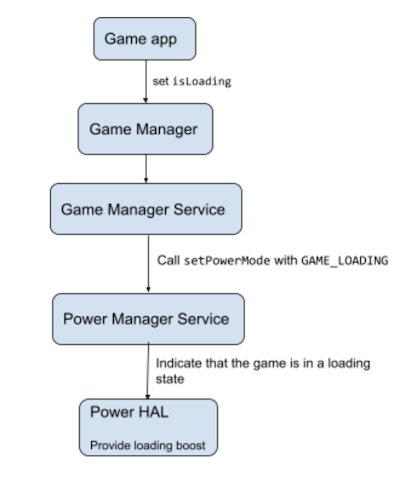
Common Causes of Slow Load Times
Before diving into solutions, it’s crucial to understand what causes slow loading times in Android games. Here are several common factors:
- Large Asset Sizes: Games often require high-quality graphics and audio, leading to large file sizes that can slow down loading times.
- Inefficient Coding: Poor coding practices can lead to performance issues. For example, using outdated libraries or complex algorithms can result in longer load times.
- Device Compatibility: Android devices vary widely in terms of hardware capabilities. Games that are not optimized for lower-end devices may load slower on them.
- Background Processes: Other applications running in the background can consume system resources, affecting the performance of the game being played.
- Network Issues: For online games, slow internet connections can lead to delays in loading game assets, affecting the overall experience.
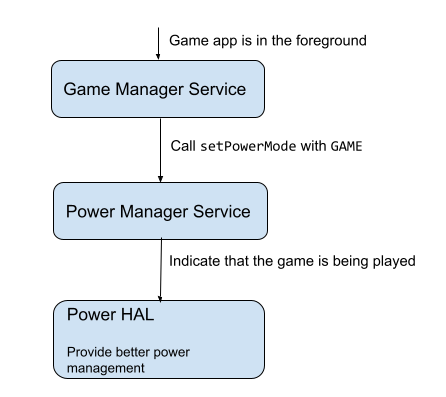
Optimization Techniques for Android Games
Once developers are aware of the common causes of slow load times, they can implement various optimization techniques to enhance performance. Here are ten proven methods:
- Reduce Asset Sizes: Compress graphics and audio files without sacrificing quality. Tools like TexturePacker can help in optimizing textures.
- Lazy Loading: Implement lazy loading for game assets, which loads only the necessary resources at the start, while deferring the rest until needed.
- Efficient Coding Practices: Use clean and efficient code. Avoid redundancy and optimize algorithms to improve load times.
- Asset Bundling: Group related assets together to reduce the number of file calls during loading, streamlining the process.
- Preloading: Load essential game assets during splash screens or menus to prepare for gameplay before the player starts.
- Use of Background Threads: Load non-essential assets in the background while allowing players to begin interacting with the game.
- Database Optimization: If your game uses a database, ensure that queries are optimized and that data retrieval is efficient.
- Minimize Network Calls: For online games, reduce the number of network calls made during loading by consolidating data requests.
- Testing on Various Devices: Conduct performance testing across a range of Android devices to identify bottlenecks and optimize accordingly.
- Regular Updates: Keep the game updated with performance patches and improvements based on user feedback and technological advancements.

Tools for Performance Measurement
To ensure that optimization efforts are effective, developers need reliable tools for measuring and analyzing game performance. Here are some popular tools:
- Android Profiler: Integrated into Android Studio, this tool helps monitor CPU, memory, network, and energy usage, providing insights into performance bottlenecks.
- Unity Profiler: If you're using Unity for game development, this tool allows you to track performance metrics and identify slow-loading assets and scripts.
- GameBench: A powerful performance monitoring tool that provides real-time data on frame rates, CPU usage, and memory consumption.
- Firebase Performance Monitoring: This tool helps developers understand how their app performs in the real world, providing insights into load times and user experience.

Testing and Debugging for Speed
Testing and debugging are critical steps in ensuring optimal performance. Here are some effective methods:
- Load Testing: Simulate various scenarios to see how your game performs under different conditions and user loads.
- Debugging Tools: Use debugging tools to identify and fix performance issues within your codebase.
- User Feedback: Gather feedback from players about loading times and performance. This can help pinpoint areas needing improvement.
- Regular Updates: After making optimizations, continue testing and updating your game regularly to maintain performance standards.
FAQ
What factors affect loading time in games?
Loading times in games can be affected by several factors, including large asset sizes, inefficient coding practices, device compatibility, background processes, and network issues. By understanding these factors, developers can take steps to mitigate them and improve load times.
How can I test my game's load speed?
To test your game's load speed, utilize performance measurement tools like Android Profiler, Unity Profiler, or GameBench. Conduct load testing by simulating various user scenarios and gather feedback from players regarding their experiences. This comprehensive approach will help identify bottlenecks and areas for optimization.
In conclusion, optimizing load times is essential for delivering a satisfying gaming experience for users in Malaysia. By understanding the common causes of slow loading times and implementing the techniques and tools outlined above, developers can significantly enhance the performance of their Android games, keeping players engaged and coming back for more.