Top Reasons Why Your Game Keeps Crashing in 2026
The gaming landscape in Malaysia has evolved tremendously over the years, with more players engaging in a variety of genres and platforms. However, one common frustration that many gamers face is game crashes. If you’ve ever been in the middle of an intense match only for your screen to freeze or your game to shut down unexpectedly, you’re not alone. Understanding the reasons why your game keeps crashing can enhance your gaming experience and help you resolve these issues quickly.
Common Causes of Game Crashes
Game crashes can stem from a variety of issues. Understanding these can help you prevent them from occurring. Here are some prevalent reasons:
Software Conflicts
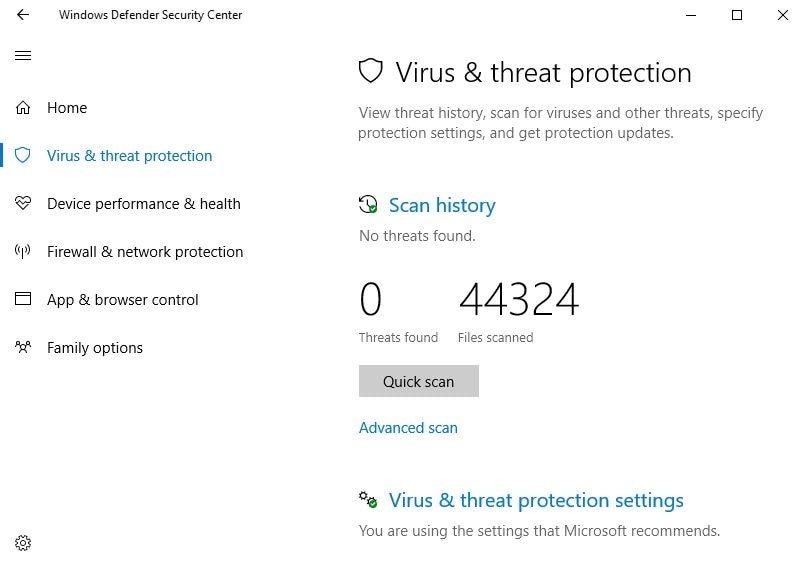
One of the most common causes of game crashes in 2026 is software conflicts. Background applications, such as antivirus software or system utilities, can interfere with your gaming experience. For instance, when a game tries to access system resources that are being used by another application, it can lead to instability and crashes. This is particularly true for programs that require significant CPU or memory resources.
Insufficient Hardware
Another significant factor is insufficient hardware. Many modern games have high system requirements, and failing to meet these can lead to crashing issues. For example, games like Cyberpunk 2077 or Call of Duty: Modern Warfare require powerful GPUs from companies like NVIDIA or AMD to run smoothly. Always check the minimum and recommended specifications for the games you want to play:
- Minimum Specs: These are the bare minimum your system needs to run the game.
- Recommended Specs: These specifications ensure a more stable and enjoyable experience.
How to Fix Crashing Issues
Now that we’ve explored the common causes, let’s discuss how to fix these issues effectively. Here are some actionable steps you can take:
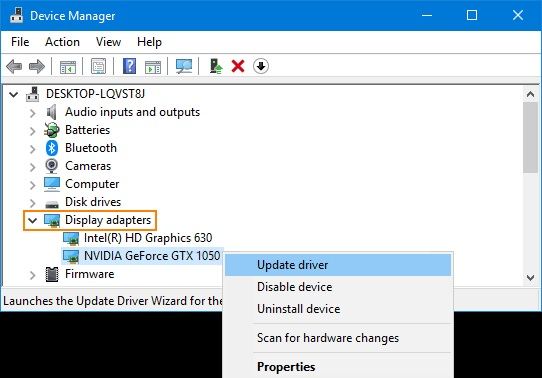
Update Drivers
Keeping your graphics drivers up to date is crucial. Outdated drivers can lead to performance issues and crashes. Make sure to regularly check for updates for your GPU from NVIDIA or AMD. This ensures that your system is optimized for the latest games.
Verify Game Files
If a game continues to crash, verifying the integrity of the game files can often resolve issues. Platforms like Steam and Epic Games offer straightforward methods to check for corrupted or missing files. Here’s how to do it:
- Steam: Right-click on the game in your library, select 'Properties', then go to the 'Local Files' tab and click on 'Verify Integrity of Game Files.'
- Epic Games: Go to your library, click on the three dots next to the game, and select 'Verify.'
User Experiences
Listening to the experiences of fellow gamers can provide valuable insights. Many players from the Malaysian gaming community have shared their frustrations with game crashes.
Common User Complaints
Some frequent issues reported by gamers in Southeast Asia include:
- Unexpected crashes during gameplay.
- Long loading times leading to timeout errors.
- Inability to launch games due to software conflicts.
Players often express their frustrations in forums, highlighting the need for better solutions and tips to manage these problems effectively.
Technical Troubleshooting
If you find that your game continues to crash despite following the initial troubleshooting steps, it may be time to explore deeper technical solutions.
Monitoring System Performance
Using performance monitoring tools can help you identify issues that might be affecting your gameplay. Software like MSI Afterburner or Windows Performance Monitor allows you to track CPU, GPU, and memory usage while gaming. Here are some tips to help you get started:
- Monitor temperatures: Ensure that your CPU and GPU are not overheating.
- Check resource usage: Look for any unusual spikes in usage that might indicate a problem.
- Adjust settings: Lowering graphics settings can reduce the load on your system and improve stability.
Frequently Asked Questions
What causes games to crash?
Games can crash due to a variety of reasons, including software conflicts, outdated drivers, and hardware that does not meet the game’s requirements. Additionally, background applications can interfere with the game’s performance.
How can I prevent my game from crashing?
To prevent crashes, ensure that your system meets the minimum requirements for the game, keep your drivers updated, and regularly verify your game files. Additionally, consider closing unnecessary background applications to free up resources.
Understanding the reasons why your game keeps crashing in 2026 can empower you to take action and enjoy a smoother gaming experience. By following the tips and solutions mentioned, you can minimize disruptions and immerse yourself in the exciting world of gaming.